WALLETS & SECURITY

Sending Cryptocurrency to Hardware Wallets From Exchanges
Buying crypto on an exchange is step one. Moving it to a hardware wallet you control is step two, and for anyone holding more than they’d be comfortable losing in an exchange failure, it’s a step that shouldn’t be skipped.
As covered in our resource on the risks of keeping crypto on an exchange, exchange custody exposes your assets to insolvency risk, hack risk, withdrawal freezes, and regulatory intervention. A hardware wallet you control directly eliminates all of those risks. Your assets are under your custody, secured by your private keys, and accessible only to you.
The process of moving crypto from an exchange to a hardware wallet is straightforward once you understand it. This guide walks through every step clearly, covers the mistakes that catch people out, and gives you the confidence to execute the transfer safely every time.
Before You Start: What You Need in Place
Before initiating any transfer from an exchange to a hardware wallet, make sure the following are in place.
Your hardware wallet is set up correctly. Your device should be initialised, your PIN set, and your seed phrase backed up securely before any funds are sent to it. Sending crypto to a hardware wallet that hasn’t been properly set up and backed up is an unnecessary risk. Our setup guides for Ledger, Trezor, Coldcard, SafePal, Bitbox, and Tangem walk through the complete setup process for each device.
Your seed phrase is backed up and stored securely. Before sending any meaningful amount to your hardware wallet, your seed phrase backup must exist and must be verified. Our step-by-step crypto wallet backup guide and advanced seed phrase storage resource cover both in detail.
Your exchange account has two-factor authentication enabled. Withdrawals from your exchange account should be protected by two-factor authentication at minimum. This protects against unauthorised withdrawals if your account credentials are ever compromised.
You know which network your assets are on. This is one of the most critical points in the entire process and is covered in detail below.
Step 1: Generate a Receiving Address on Your Hardware Wallet
The first step is to get the receiving address from your hardware wallet for the specific asset you intend to receive.
Open the companion application for your hardware wallet. For Ledger this is Ledger Live. For Trezor this is Trezor Suite. For Bitbox this is BitBoxApp. Connect your device and navigate to the account for the asset you want to receive.
Select “Receive” and the application will display a wallet address for that asset. This address is generated by your device and is the destination for your transfer.
Critical step: verify the address on the device screen itself. The companion application displays the address on your computer screen, but you must also confirm it on the hardware wallet device’s own screen. These should match exactly. If they don’t match, stop immediately. A compromised computer could display a different address than what the device has generated. The device screen is the trusted source. Always verify there first.
Once verified, copy the address displayed. Do not type it manually under any circumstances. A single character error sends your funds to an unrecoverable address.
Step 2: Confirm the Network
Before doing anything else with the address you’ve just copied, confirm which network it belongs to. This is the step that causes the most costly mistakes in crypto transfers and it deserves complete attention every single time.
Different blockchains have different address formats, and many assets exist on multiple networks. Ethereum and all ERC-20 tokens share the same address format, as do assets on other EVM-compatible networks like BNB Smart Chain, Polygon, and Avalanche. This means an Ethereum address and a BNB Smart Chain address can look identical, but they are on entirely separate networks. Sending ETH to an address on BNB Smart Chain, or vice versa, results in funds that are at best recoverable with significant technical effort and at worst permanently lost.
Bitcoin has its own address format, entirely distinct from EVM-compatible addresses. Solana has its own address format. Each major blockchain uses a different format, and in all cases, sending assets to an address on the wrong network is a critical error.
In your hardware wallet companion app, confirm the network clearly before copying the address. In your exchange withdrawal interface, confirm the network clearly before selecting it. They must match.
Step 3: Navigate to the Withdrawal Section on Your Exchange
Log in to your exchange account and navigate to the withdrawal or send section. This is typically found under your account wallet, portfolio, or funds section depending on the platform.
Select the asset you want to withdraw. Confirm you’re withdrawing the correct asset and not a similar one. Many exchanges list multiple versions of the same asset on different networks, for example USDT on Ethereum, USDT on Tron, and USDT on Solana all listed separately. Select the version that corresponds to the network your hardware wallet address is on.
Step 4: Enter the Withdrawal Details
With the withdrawal section open and the correct asset selected, you now enter the details of the transfer.
Paste the receiving address. Paste the address you copied from your hardware wallet companion app into the recipient address field. After pasting, visually verify the first six and last six characters of the pasted address against the address shown on your hardware wallet screen. This verification step protects against clipboard hijacking malware that replaces copied addresses with an attacker’s address. As covered in our advanced crypto security resource, clipboard hijacking is an active and silent threat that has cost investors significant funds.
Select the network. Most exchanges will prompt you to select the network for the withdrawal. This must match the network of your hardware wallet receiving address. If you’re withdrawing Ethereum, select the Ethereum network. If you’re withdrawing Bitcoin, select the Bitcoin network. Do not select an alternative network unless you have specifically set up your hardware wallet to receive on that network and have verified the address accordingly.
Enter the amount. Enter the amount you wish to withdraw. Be aware that the exchange will deduct a withdrawal fee from the amount sent or charge it separately, depending on the platform. Our understanding trading fees resource covers withdrawal fee structures in detail.
Start with a test transaction. If this is the first time you’re sending to this hardware wallet address, send a small test amount first. Confirm it arrives in your hardware wallet companion app before sending the full amount. The cost of a small test transaction is negligible compared to the risk of discovering an error after sending a large amount. This habit is especially important when setting up a new hardware wallet for the first time.
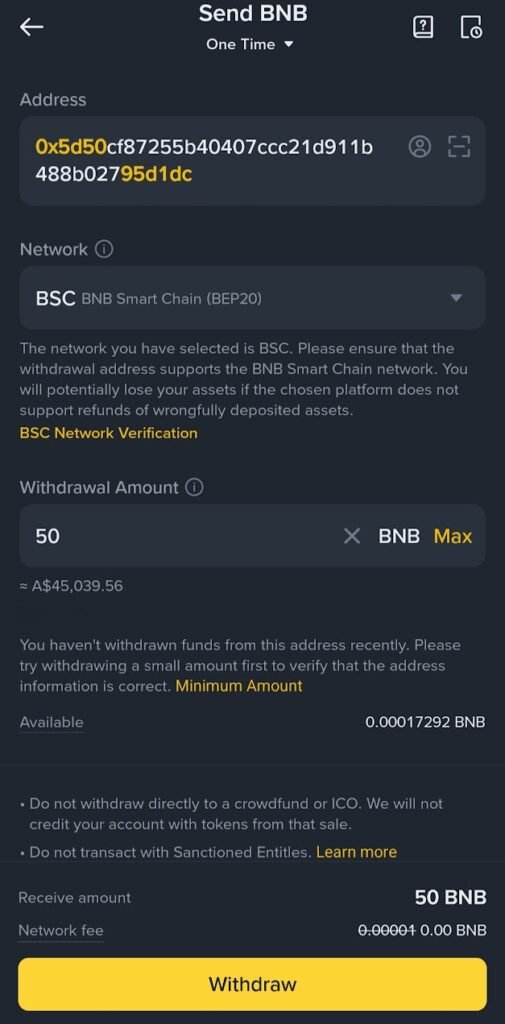
Step 5: Complete the Security Verification
Before the exchange processes your withdrawal, it will typically require security verification. This usually involves confirming the withdrawal through your two-factor authentication app, confirming via an email link, or both.
Complete this verification carefully. At this stage, review the withdrawal details one final time before confirming. Confirm the recipient address, the network, and the amount. Once the withdrawal is confirmed and processed by the exchange, it cannot be reversed.
Some exchanges also have withdrawal whitelist features that restrict withdrawals to pre-approved addresses. If you use this feature, you’ll need to add your hardware wallet address to your whitelist before you can withdraw to it. While the setup process takes a little longer, whitelisting is worth enabling as an additional security layer that prevents funds being sent to an unauthorised address even if your account is compromised.
Step 6: Track the Transaction and Confirm Receipt
After the withdrawal is initiated, the exchange will typically provide a transaction ID (TXID) or a link to the transaction on a blockchain explorer. Use this to track the status of your transfer in real time.
Confirmation times vary by network. Bitcoin typically requires 10 to 60 minutes depending on network congestion and the fee attached to the transaction. Ethereum is generally faster. Solana confirms in seconds. Most exchanges require a minimum number of network confirmations before the withdrawal is considered final.
Once the transaction has reached the required number of confirmations, open your hardware wallet companion app and confirm the balance has updated to reflect the received funds. Your assets are now in your self-custody and accessible only through your hardware wallet device and seed phrase.
Common Mistakes and How to Avoid Them
Sending to the wrong network. The most common cause of lost funds in exchange-to-hardware-wallet transfers. Always confirm the network on both the exchange and the hardware wallet side before initiating a transfer.
Not verifying the address on the device screen. A compromised computer can display a different address than what your hardware wallet is generating. The device screen is the only trusted verification source.
Skipping the test transaction. The test transaction is your insurance policy. Always use it when sending to a new address for the first time.
Ignoring clipboard hijacking risk. Always visually verify the first and last six characters of a pasted address before confirming. As covered in our how to send and receive cryptocurrency safely resource, this single habit prevents one of the most effective and silent attacks in the space.
Sending before the wallet is properly set up and backed up. Assets sent to a hardware wallet whose seed phrase hasn’t been backed up are at risk from the moment of transfer. Set up and back up first. Transfer second.
Forgetting to account for the tax record. Every withdrawal from an exchange to a hardware wallet is not a disposal event for capital gains tax purposes in Australia, as you still own the same asset. However, the transaction record is important for establishing your cost base and holding period. Keep records of every transfer including the date, amount, and AUD value at the time of transfer for ATO crypto reporting purposes.
Which Hardware Wallets Work Best for This Process
All major hardware wallets support receiving crypto from exchanges. The process is fundamentally the same across devices, with minor differences in the companion application interface.
Ledger supports the widest range of assets through Ledger Live and is one of the most widely used hardware wallets globally. Trezor offers strong open-source security and excellent companion software through Trezor Suite. Coldcard is the preferred choice for Bitcoin-only holders prioritising maximum security. Bitbox, SafePal, and Tangem each offer specific advantages depending on your needs and preferences.
Our choosing the right hardware wallet and which cryptocurrency wallet is right for you resources cover the full comparison if you’re still deciding which device best suits your situation.
Key Takeaways
Moving crypto from an exchange to a hardware wallet is one of the most important security decisions a crypto investor makes. Set up and back up your hardware wallet completely before initiating any transfer. Generate the receiving address in your companion app and verify it on the device screen. Confirm the network matches on both sides. Paste the address carefully and visually verify after pasting. Send a test transaction first. Complete the exchange’s security verification and track the transaction through to confirmed receipt.
Every step exists for a reason. The few minutes it takes to do this correctly every time is the difference between assets that are genuinely secure and assets that are one mistake away from being permanently lost.
For everyday investors making the move to self-custody for the first time, our Runite Tier Membership includes dedicated self-custody and security education with step-by-step guidance designed to make the process straightforward and confident. For serious investors managing significant holdings across multiple wallets and custody solutions, our Black Emerald and Obsidian Tier Members receive personalised guidance on building a complete custody and security framework.
Find out more at shepleycapital.com/membership.
WRITTEN & REVIEWED BY Chris Shepley
UPDATED: MARCH 2026
Choose your next topic from our Cryptopedia