











Choosing the Right Hardware Wallet: A Complete Investor Guide
The right hardware wallet depends on what you hold and how you use it. Ledger suits most investors who want broad coin support and a polished app; Coldcard suits Bitcoin-only holders who want maximum security and air-gapped signing; BitBox02 balances open-source transparency with ease of use; SafePal offers air-gapped, QR-based signing at a low price; and Tangem’s card format is the simplest to carry and set up. Whichever you choose, buy direct from the maker, set it up yourself, and protect the backup. The key points:
- All of these keep your private keys offline and require approval on the device.
- Check that a device supports every coin and network you hold before buying.
- Never use a device that arrives with recovery words already written or printed.
- Your backup, not the device, is what ultimately protects your funds.
Moneysmart’s overview of crypto assets explains the risks of holding crypto yourself, and its guide to investment scams shows how fake devices and support scams work.
When it comes to securing cryptocurrency, hardware wallets are the gold standard for investors. They provide cold storage, meaning your private keys never touch the internet, which protects your assets from hacks, malware and phishing attempts.
But not all hardware wallets are created equal. Ledger is the most widely used brand, while challengers such as Coldcard, BitBox, Tangem and SafePal offer different philosophies, ecosystems and security models designed for specific users. This guide breaks down each of these hardware wallets, explaining how they work, how they differ, and which one might best suit your setup.
What Is a Hardware Wallet?
A hardware wallet is a physical device that securely stores your crypto private keys offline.
When you send or sign a transaction:
- The transaction is created on your computer or phone.
- It’s sent to the hardware wallet for offline signature.
- The wallet signs the transaction internally (without exposing the private key).
- The signed transaction is sent back to the blockchain network.
Your keys never leave the device, meaning even if your computer is compromised, your funds stay secure.
Hardware wallets are most commonly used by long-term holders, traders, and institutions who prioritise self-custody and security.
How a cold wallet compares with other options is part of deciding which wallet is right for you.
It’s time for a complete break-down of each available hardware wallet. Feel free to select your desired wallet choice, otherwise take the time to read through each wallet to find out which may be right for you.
To skip straight to your desired wallet choice, click the button below for direct access.
Ledger Wallet
What is Ledger: Company Background & Evolution
When it comes to safely storing crypto, Ledger is one of the most recognised names in the space. Founded in 2014, Ledger built its reputation around one goal; helping people take full ownership of their digital assets through secure hardware wallets.
At its core, Ledger is a cold storage device. That means it keeps your private keys offline, away from the internet and potential hacks. The device itself acts as your personal vault, where transactions must be approved physically by you before anything moves on-chain.
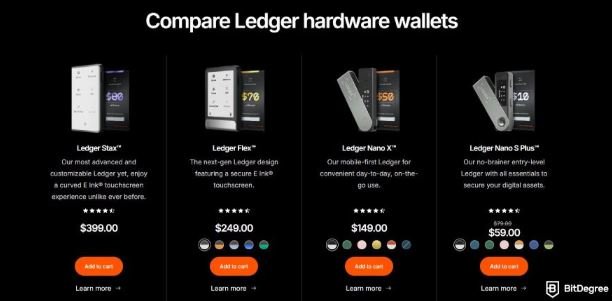
Ledger’s product line has expanded from their initial Nano wallets into Nano X, Nano S Plus, and now into their newer models like Ledger Stax and the Ledger Flex. From an enterprise side, Ledger also offers institutional products (Ledger Vault, Ledger Enterprise) beyond consumer hardware.
‘Ledger Live’ is the ecosystem’s software hub. The companion App allows you to view your portfolio, send & receive assets, install apps for each token, and even stake certain cryptocurrencies directly, all while your private keys never leave the device.
Beyond being a wallet, Ledger’s ecosystem also integrates security layers, educational content, and institutional-grade solutions for businesses. Their Secure Element chips (the same kind used in passports and credit cards) add another level of protection against physical tampering or malware.
Ledger’s strength lies in control and independence. You’re no longer trusting an exchange to hold your funds. Instead, you’re holding them yourself. For everyday investors, that’s the difference between having crypto and owning it.
Hardware Models & Features
Ledger offers several hardware wallet models, each targeted at slightly different use-cases.
Models
- Ledger Nano S Plus: the entry model; USB-C, compact, supports many assets, connects by cable.
- Ledger Nano X: adds Bluetooth for mobile use, a built-in battery and more app storage.
- Ledger Stax: a premium model with a large curved E Ink touchscreen, Bluetooth and wireless charging.
- Ledger Flex: a mid-range model with a large E Ink touchscreen and Bluetooth, making it easier to read transaction details. (And our personal favourite.)
Feature Highlights
- Secure Element Chip (tamper-resistant hardware) for storing private keys.
- Companion appLedger Live to install apps for individual cryptocurrencies, send/receive, stake tokens, etc
- Multi-asset support: Big list of coins, tokens, networks.
- Mobile + Desktop compatibility (especially with Nano X)
- Recovery via seed phrase: When you set up a Ledger device, you generate a 24-word (or sometimes 12/24) seed phrase which allows you to recover funds if the device is lost.
Security Model: What Makes Ledger Secure
Ledger’s entire ecosystem is built on the idea of security through isolation; keeping your private keys completely separated from online environments where most hacks occur.
- Secure Element (SE) Chip: Every Ledger device is powered by a Secure Element chip, the same type of chip used in passports, credit cards, and banking systems. This chip is designed to protect against both digital and physical attacks, meaning even if your computer is compromised, your private keys remain safe inside the device.
- Secure OS + Attestation: Ledger’s firmware and operating system, known as BOLOS (Blockchain Open Ledger Operating System), creates a secure execution environment where each crypto app runs independently. This sandboxed approach means a vulnerability in one coin’s app cannot compromise the rest of your wallet.
- PIN protection / device control: Ledger devices undergo third-party security audits and follow strict manufacturing processes that prevent tampering before the product reaches you. Combined with Ledger’s PIN protection, passphrase support, and recovery seed system, the result is a multi-layered security model that’s trusted by both retail users and institutions.
- Seed phrase backup: Your recovery phrase is the ultimate fall-back, so Ledger emphasises safe storage of that. Specifically, it’s recommended to keep a paper copy of your seed phrase stored somewhere safe; away from water or fire damage.
- Firmware updates: The company issues regular security patches, updates to firmware and Ledger Live. Users are urged to update to stay safe.
What this means: If you use the device correctly (buy from trusted source, initialise it yourself, keep recovery phrase safe, update firmware), your private keys are highly protected from most internet-based attacks.
Pros & Strengths of Ledger
Based on expert reviews and features, major strengths of Ledger include:
✅ Industry-Leading Security
Ledger uses Secure Element chips and its proprietary BOLOS operating system to isolate and protect private keys. This multi-layer security model is trusted by both retail users and institutions worldwide.
✅ Offline Protection (Cold Storage)
Private keys never touch the internet. All signing happens within the device, keeping funds safe even if your computer or phone is compromised.
✅ User Ownership and Control
Ledger gives you complete custody of your crypto. You approve every transaction physically, meaning no one, not even Ledger, can move your assets without your confirmation.
✅ Wide Asset Support
Ledger says it supports more than 5,500 cryptocurrencies and tokens through the Ledger Live app, with continuous updates for new blockchains and protocols.
✅ Integration with Ledger Live Ecosystem
Ledger Live makes it easy to view your portfolio, stake assets, and manage transactions, all without compromising security.
✅ Portability and Durability
Compact, travel-safe devices built with robust materials. You can store or move significant value with something smaller than a USB drive.
✅ Reputation and Transparency
Ledger has a long track record and one of the largest user bases of any hardware wallet maker. Its devices themselves have a strong security record, although a 2020 leak of customer contact details led to years of phishing attempts against Ledger owners.
Cons & Limitations of Ledger
❌ Not Fully Open Source
While Ledger’s apps and interfaces are open-source, its firmware and Secure Element code are closed. This limits full community verification of its security processes.
❌ Requires Technical Understanding
Ledger is beginner-friendly overall, but initial setup still requires careful attention to recovery phrases, app installations, and firmware updates. Mistakes during setup can cause access issues later.
❌ Centralised Recovery Concerns
Ledger’s optional “Recover” feature raised privacy debates, as it involves encrypted key backups with third-party custodians. While optional, it created concern among users who prefer full decentralisation.
❌ Physical Risk Still Exists
The device itself can be lost, stolen, or damaged. Without a correctly stored recovery phrase, assets on the wallet are permanently unrecoverable.
❌ Limited Mobile Usability (Nano S Plus)
The Nano S Plus lacks Bluetooth and requires a cable connection. The Nano X, Stax and Flex support Bluetooth pairing with a phone, which is more convenient for on-the-go users.
❌ Price Point vs. Simpler Alternatives
Ledger offers premium-grade security, but it’s more expensive than basic software wallets. For casual holders, the cost may feel high relative to simpler storage options.
How to Setup & Use your Ledger
You can set up a Ledger in about 20 minutes by following the Ledger setup steps, from unboxing to your first test transaction.
Here’s a typical setup flow for using a Ledger hardware wallet:
- Purchase from official source: ensure sealed, new device.
- Connect to computer or mobile, download official Ledger Live from ledger.com.
- Initialise device: choose “Set up as new device”.
- Create PIN on the device.
- Write down your recovery seed phrase (24 words recommended) on the provided cards (or your metal backup) and store securely offline.
- Install apps for each cryptocurrency you want to hold via Ledger Live (e.g., Bitcoin, Ethereum, etc.).
- Send funds to your Ledger address: you receive a public address via device+app, verify on device screen, then send from exchange/hot wallet to your Ledger address.
- Regularly update firmware and software: ensure device and Ledger Live are updated; check for authenticity signs.
- For mobile use (Nano X, Stax): pair with Bluetooth if required, but many experts recommend USB connection for maximum security.
- Safely store recovery phrase and safely move long-term holdings.
Remember: Your funds are only truly secure if your seed phrase is safe and private, and you verified device authenticity.
Ledger is the brand most crypto investors start with. But for those looking for a hardware wallet that specialises in a specific niche, here are some strong alternatives.
Coldcard Hardware Wallet
What is Coldcard: Company Background & Evolution
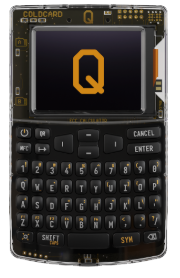
The Coldcard Mk4 is a hardware wallet designed exclusively for Bitcoin by Canadian based company, Coinkite. It emphasises maximum security and self-custody through features like dual Secure Element chips, air-gapped workflows (via microSD/NFC), and a physical keypad. A Coldcard keeps private keys offline to protect against malware and computer vulnerabilities and uses a dedicated security chip to store them. It’s known for its strong security features, including its air-gapped design and the ability to verify transactions on its own screen before signing, making it a popular choice for users prioritising security.
Key Features
Bitcoin-Only Security Architecture
Coldcard is purpose-built for Bitcoin. By limiting its scope to a single asset, it reduces attack surfaces and eliminates vulnerabilities that can arise from managing multiple blockchains. This focused design appeals to serious Bitcoin investors who value long-term, uncompromising security.
True Air-Gapped Operation
Coldcard can be used completely offline, meaning it never needs to connect to a computer or the internet. Transactions are signed using a microSD card, allowing users to transfer data between the wallet and a computer without any direct physical connection. This removes nearly all remote hacking vectors.
Secure Element & Dual-Chip Design
Unlike some open-source wallets that avoid hardware encryption, Coldcard integrates a Secure Element chip alongside a Microcontroller Unit (MCU). The Secure Element safely stores private keys, while the MCU handles the device’s interface and user interactions. These two chips communicate through controlled pathways, limiting potential exploitation.
Open-Source Firmware & Verifiable Builds
While it uses a Secure Element, Coldcard’s firmware and wallet logic are fully open-source, allowing the crypto community to audit the code for transparency. Users can verify firmware hashes before installation to ensure authenticity and integrity.
Advanced PIN Protection and Brick-Me Feature
Coldcard uses an innovative anti-phishing PIN system: the PIN is entered in two parts, and between them the device shows two anti-phishing words that confirm it is your genuine Coldcard. It also features a Brick-Me PIN, which allows users to permanently wipe the device if they’re ever coerced or feel compromised.
Multi-Sig and Compatibility with Major Wallets
Coldcard integrates seamlessly with popular Bitcoin wallet software such as Sparrow, Specter, Electrum, and BlueWallet. It supports multi-signature configurations, making it ideal for advanced investors who use multiple devices or custodial setups for added protection.
No Cloud Dependence or Centralised Software
All security logic runs locally on the device. There’s no need for third-party platforms or accounts, meaning users maintain full sovereignty over their Bitcoin holdings; no company can restrict or recover your wallet.
Tamper-Evident Hardware Design
Coldcard ships in tamper-evident packaging, and the device itself has a transparent case that allows users to visually inspect for hardware modification. Each unit is sealed with a unique bag number and verification checklist to ensure authenticity before first use.
Secure Backup & Recovery Options
Coldcard uses the industry-standard BIP39 seed phrase system and allows encrypted backups via microSD. It also supports advanced options like BIP85 deterministic child seeds, letting users generate new wallets or hot wallets from a single secure root without exposing the original seed.
Developer & Power User Features
Coldcard includes functions such as PSBT (Partially Signed Bitcoin Transactions), script inspection, and address verification, giving advanced users complete transparency and control. It’s a wallet built for those who truly want to understand what’s happening under the hood.
Pros & Strengths of Coldcard
✅ Bitcoin-Only Focus = Maximum Security
Coldcard is built exclusively for Bitcoin. By removing the complexity of supporting multiple blockchains, it drastically reduces potential attack surfaces. This makes it one of the most secure wallets available for Bitcoin holders.
✅ True Air-Gapped Operation
You can use Coldcard completely offline, with no USB or Bluetooth connections required. Transactions are signed via microSD card, meaning your private keys never come into contact with an internet-connected device.
✅ Dual-Chip Architecture (with Secure Element)
Coldcard combines a Secure Element chip for private key protection with a separate microcontroller that handles the user interface. This layered approach keeps security-critical functions isolated from potential threats.
✅ Advanced PIN and “Brick-Me” Protection
Its anti-phishing PIN entry system protects against fake devices or phishing attempts. The optional Brick-Me PIN permanently wipes the wallet in emergencies; perfect for users who value absolute control over their security.
✅ Built for Long-Term Storage
Coldcard is a true cold wallet designed for investors who intend to hold Bitcoin for years. It’s durable, offline, and independent; ideal for securing generational wealth outside of exchanges or intermediaries.
Cons & Limitations of Coldcard
❌ Bitcoin-Only Support
One person’s considered strength is another person’s limitation. Coldcard supports Bitcoin exclusively. While this focused design improves security, it means users holding altcoins or stablecoins will need a separate wallet solution for those assets.
❌ Steeper Learning Curve
Coldcard’s advanced security features, like PSBT files, multi-sig configurations, and microSD signing all require more technical understanding than plug-and-play wallets like Ledger. It’s best suited for users who are comfortable learning detailed processes.
❌ Less User-Friendly Interface
Its small monochrome screen and basic button navigation get the job done but feel outdated compared to touchscreens and modern app interfaces. Functionality outweighs design here, but it’s not built for ease of use.
❌ No Companion App of Its Own
Coldcard has no companion app of its own. Most management happens through compatible desktop wallets like Sparrow or Electrum, with some mobile wallets such as Nunchuk and BlueWallet also supported, which may not suit casual crypto investors.
❌ No Altcoin or DeFi Support
Since Coldcard is purely Bitcoin-focused, users can’t stake, swap, or interact with smart contracts directly from the device. For those invested in broader DeFi ecosystems, this is a major limitation.
❌ Manual Process for Transactions
Because it’s air-gapped, Coldcard requires transferring files via microSD cards for every transaction. This process maximises security but reduces convenience for those who move funds frequently.
❌ Niche Market Appeal
Its design philosophy prioritises maximum security over accessibility. While perfect for long-term Bitcoin holders, it’s overkill for beginners or casual investors looking for simplicity.
How to Setup & Use your Coldcard
The Coldcard setup steps cover every stage in detail, from the bag check to your first air-gapped transaction.
1. Verify the device. Check the tamper-evident bag is intact, then power on and confirm the bag number shown on screen matches the number on the bag.
2. Set the PIN. Create the two-part PIN and write down the two anti-phishing words shown after the first part.
3. Update firmware. Load the latest firmware from Coldcard’s official website.
4. Create a new wallet. Generate new seed words and write the 24 words down on paper only.
5. Make a backup (optional). Insert a microSD card and use the backup option to create an encrypted backup file, and record its password separately.
6. Pair with a desktop wallet. Install Sparrow or Electrum on your computer, export the wallet file from the Coldcard to microSD, and import it into the desktop wallet.
7. Receive your first Bitcoin. Generate a receive address in the desktop wallet and check it on the Coldcard screen before sharing it.
BitBox Hardware Wallet
What is BitBox: Company Background & Evolution
The Bitbox, natively known as BitBox02 is a hardware wallet designed to store your cryptocurrency private keys offline, meaning your keys are never exposed to the internet when making transactions or holding assets. Originating from Switzerland, the Bitbox comes in two main editions: a Multi-asset edition (supports many coins and tokens) and a Bitcoin-only edition (simplified firmware with a reduced attack surface). Manufactured by Shift Crypto AG, Bitbox promotes itself to be known for privacy-focused design and open-source firmware.
Key Features
Two Editions for Different Investors
BitBox02 comes in two models:
- Bitcoin-Only Edition, built for maximum security with minimal code.
- Multi-Edition, supporting Bitcoin, Ethereum, Litecoin, and ERC-20 tokens.
This allows investors to choose between ultra-focused security or broader asset coverage.
Open-Source Firmware and Software
Both the firmware and companion app (BitBoxApp) are fully open-source. This gives the global security community the ability to audit, verify, and improve the code, creating a transparent and trusted security foundation.
Dual-Chip Security Architecture
BitBox02 uses a secure element to store private keys and a separate microcontroller to run the interface and wallet functions. This split design keeps sensitive cryptographic operations isolated from general processes, strengthening defence against both physical and remote threats.
microSD Backups
BitBox02 can write its backup to a microSD card, which is beginner-friendly and reduces the risk of errors when recording a seed phrase, while still allowing full wallet recovery. The card holds everything needed to restore your wallet, so guard it like a written seed phrase. (We also recommend recording the recovery words on paper or metal as a second backup.)
Touch and Swipe Controls
The device uses capacitive touch sensors for navigation; tap, slide, and hold gestures replace traditional buttons. This design is intuitive, minimalistic, and reduces mechanical failure risk.
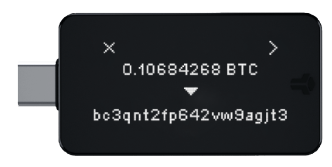
OLED Display for Verification
A basic 128×64 pixel OLED screen displays every transaction detail directly on the device. You can verify addresses, amounts, and confirmations with full clarity before signing.
USB-C Plug-In Design
BitBox02 plugs directly into USB-C ports without cables. The design is compact and durable for everyday use.
Multi-Platform BitBoxApp Ecosystem
The BitBoxApp is available on Windows, macOS, Linux, and Android; giving you complete ability to manage accounts, update firmware, display balances, and handle secure signing while keeping all private keys inside the hardware wallet.
Hidden Wallets and Passphrase Support
Advanced users can enable passphrases to create hidden wallets. This adds another layer of privacy and protection if the device is ever stolen, accessed, or inspected.
Pros & Strengths of BitBox
✅ One of the easiest hardware wallets for beginners
The setup process is smoother than most competitors. The microSD backup option removes the stress of writing 24 words perfectly on day one, making it far less intimidating for new investors.
✅ Extremely transparent and community-trusted
Because every part of BitBox02’s software is open-source, it has earned a reputation for honesty. Security researchers consistently validate the code, which builds long-term trust with everyday users who want clarity over secrecy.
✅ Great balance between security and usability
Unlike some high-security wallets that feel difficult or slow to use, BitBox02 maintains strong security while still feeling simple and intuitive. It hits a rare middle ground that suits both beginners and experienced holders.
✅ Comfortable daily-use experience
The touch gestures, clean interface, and BitBoxApp make it easy to check balances, send transactions, or manage accounts without friction. For people who access their wallet often, the experience feels smooth rather than technical.
✅ The Bitcoin-Only version offers reduced attack surface
Having a specialised model designed for Bitcoin only is a real security benefit. Less code means fewer vulnerabilities. It’s ideal for long-term BTC holders who want maximum protection.
✅ Strong ecosystem support without unnecessary complexity
BitBoxApp integrates directly with portfolio management, updates, and basic security tools without overwhelming the user. Many hardware wallets require extra software, BitBox keeps everything in one place.
Cons & Limitations of BitBox
❌ Limited mobile support
BitBox02 works well on desktop, and the app also runs on mobile, but phone support depends on the model and connection type, so check it works with your phone before buying.
❌ Smaller ecosystem compared to Ledger
While BitBox supports major assets, it does not have the same wide coverage, staking integrations, or third party app support that Ledger offers. Some tokens and workflows require extra steps or external tools.
❌ MicroSD backups can cause over confidence
The microSD backup is convenient, but it holds everything needed to restore your wallet, so it must be stored as securely as a written seed phrase. If the card is lost or damaged and you have no other backup, recovery becomes impossible.
❌ Mostly cable-based connectivity
Most BitBox02 models connect by cable. This keeps things simple and secure, but people who want wireless convenience might see it as a drawback.
❌ Smaller screen compared to competitors
The display is functional but small. Verifying long addresses or detailed transaction data requires a bit more attention than on devices with larger screens.
❌ Less widely used than Ledger
BitBox02 is well respected, but it does not have the global user base that Ledger has built. Some investors prefer brands with the longest history in the market.
How to Setup & Use your BitBox
Setting up a BitBox02 takes about 15 minutes with the BitBox setup steps, including the backup and your first test transaction.
SafePal Hardware Wallet
What is SafePal: Company Background & Evolution
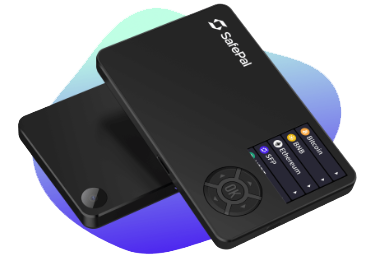
The SafePal S1 is a hardware wallet designed to offer cold-storage level security at a budget-friendly price. Unlike devices that connect via Bluetooth or USB, the S1 uses an air-gapped architecture (QR code communication, no direct wireless link) to reduce attack surface. Reviews highlight strong security features like a Secure Element chip and broad token support. Based in Singapore, Safepal is backed by a number of credible players in the crypto ecosystem.
Key Features
Fully Air-Gapped Hardware Wallet Design
SafePal’s S1 wallet is completely offline. That means zero USB connection, zero Bluetooth. zero NFC. All communication happens through QR codes, removing the need for cables or radio connections that could be exploited.
Built-In Security Components
SafePal uses a secure element chip for private key storage, along with self-destruct mechanisms that trigger if physical intrusion is detected. The Safepal device also has a wiping feature if repeated incorrect PIN attempts are made.
QR Code Signing for Transactions
SafePal uses a camera to read unsigned transaction QR codes, signs them internally, and displays a new QR code with the signed transaction. Your keys never leave the device, and data never travels through USB or wireless connections.
Portable and Affordable Hardware Wallet
SafePal S1 is smaller than a credit card and is extremely lightweight. It’s also recognised as one of the most budget-friendly hardware wallets on the market, making secure cold storage accessible to everyday investors. (Keep in mind when it comes to securely holding your finances, cheaper doesn’t always mean better).
Multi-Wallet Support
Users can create and manage multiple wallets within the same device. This is ideal for separating long-term holdings from active investing accounts or organising assets for different strategies.
Secure Firmware with Offline Upgrades
Firmware updates are done via a microSD card, ensuring the device never needs to touch a computer or the internet during the process.
Pros & Strengths of SafePal
✅ Strong hardware security (air gap + Secure Element) at price point.
✅ Great for users wanting multi-chain support without investing in ultra-premium hardware.
✅ Mobile app ecosystem (SafePal app) gives additional features such as asset management, DApp/Swap access
✅ Simplicity and portability, easier for some users to adopt self-custody.
Cons & Limitations of SafePal
❌ Firmware and ecosystem are less “battle-tested” compared to some legacy hardware wallet brands.
❌ Some models nonetheless depend on the mobile app connectivity; the “fully air-gapped” mode requires scanning QR codes which may feel less seamless than plug-and-play USB or Bluetooth for some users.
❌ Closed-source aspects: Some reviewers note that full open-source transparency is lacking.
❌ Battery, screen size, user-interface may be less refined than flagship premium models.
❌ As with all hardware wallets, the main risk remains the user: seed phrase backup, secure purchase, and correct setup.
How to Setup & Use your SafePal
The SafePal setup steps cover the QR pairing, seed phrase and firmware process in order.
Tangem Hardware Wallet
What is Tangem: Company Background & Evolution
Tangem is a Swiss-based company founded in 2017 and headquartered in Zug. Its starting mission was to make crypto self-custody secure, simple and accessible to everybody.
Early on, Tangem built smartcard-based hardware and secure chip solutions for other businesses. Over time it shifted towards retail crypto users, launching its signature product, the Tangem Wallet: a card-style hardware wallet that is minimalist yet powerful.
What makes Tangem unique is how it blends security and ease of use. The wallet uses a secure embedded chip that Tangem says is certified to EAL6+, so private keys are generated and stored on the chip and never touch the internet or your phone.
Rather than relying on a traditional seed phrase, Tangem’s default model delivers each wallet as a set of two or three cards that can all access the same funds. If one card is lost, the others still work, and current versions of the app also offer an optional seed phrase for people who want one.
Tangem later expanded to support many cryptocurrencies and blockchains, and in 2019 it received a US$15 million (about A$22 million at the time) investment from SBI Crypto Investment, part of Japan’s SBI Holdings, which helped it scale manufacturing and distribution. In 2024 it launched the Tangem Ring, a wearable wallet built with the same secure chip and NFC technology as the cards.
Tangem says its chips and firmware have been independently audited, including by Kudelski Security, and that it sells in more than 170 countries. Its goal remains the same as on day one: making self-custody secure, simple and accessible.
Key Features
Models
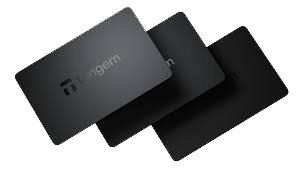
- Tangem Wallet: 2 Cards Set: Entry version; buy two cards as a set which give you primary + backup.
- Tangem Wallet: 3 Cards Set: Adds an extra card for redundancy (3 cards means one could be lost and still have two left).
- Tangem Ring: A wearable version, a ceramic ring with an embedded secure chip and NFC antenna, designed for everyday carry. It comes bundled with cards for backup.
Feature Highlights
- Card / ring form-factor: No USB cables, no batteries (for the cards), very minimalist and portable.
- NFC Connectivity: The primary device communicates with your smartphone via NFC tap to sign.
- Secure Element & Certification: Tangem says its chips meet the EAL6+ security standard and are designed to resist invasive and non-invasive attacks.
- Smart backup (card sets): Instead of exclusively using a seed phrase, the backup model involves multiple cards which each hold access capability, reducing some user risk of losing seed phrase
- Ease of use: Tangem emphasises setup in “under 3 minutes”. Designed to be beginner friendly.
- Wide asset support: Thousands of coins/tokens are supported (via mobile app & integrated services).
- Security certifications & audits: Tangem chips are claimed to be certified at CC EAL6+ (a very high security standard), with independent security audits by firms such as Kudelski Security and Riscure
Security Model: What Makes Tangem Secure
Tangem’s security model stands on several pillars:
- Private key generation & storage: The private key is generated inside the chip of the card/ring and never leaves it. This means extraction of the key is designed to be impossible without physically breaching the secure element.
- Certified secure element (EAL6+): This is among the highest security standards for chips, equivalent in some respects to those used in passports and payment cards.
- Offline / air-gapped nature: Since the cards don’t need to be connected, charged, or plugged in (for many models), they reduce many attack vectors common to USB connected devices.
- Backup via multiple cards instead of seed alone: The multi-card redundancy means losing one card doesn’t immediately result in total loss (depending on config).
- Independent audits & anti-tamper design: The firmware is audited; the hardware is built to resist tampering and environmental damage.
Important caveat: As with all self-custody solutions, user behaviour remains critical. Secure backup of your cards, safe storage, avoiding counterfeit cards, & verifying authenticity still are incredibly important.
Pros & Strengths of Tangem
Here are some of the stand-out advantages based on reviews and features:
✅ Uniquely simple & portable form factor (card or ring).
✅ Extremely durable design: resistant to elements, no battery needed for card version.
✅ Beginner friendly: setup is very quick and intuitive.
✅ Very high security certification (EAL6+), independent audits.
✅ Broad asset support (according to manufacturer).
✅ Smart backup model via multiple cards may reduce seed phrase anxiety.
Cons & Limitations of Tangem
❌ Mobile-only interface (at least traditionally): Because the cards rely on NFC and smartphone app, desktop/USB workflows may be limited compared with some hardware wallets.
❌ Slightly less mature ecosystem compared with legacy brands: Some advanced DeFi integrations, desktop wallet support, multi-sig may be less extensive.
❌ Less open than open-source designs: Tangem says its chip and firmware are audited, but some users prefer fully open-source hardware for visibility.
❌ If multiple cards are lost or stolen, backup strategy still matters: the user must treat cards like keys.
❌ If you don’t have an NFC-enabled smartphone or prefer USB workflows, the card model may feel restrictive.
Real-World Use Cases & Fit
Tangem is especially suited for:
- Users who want portability and convenience: The card or ring is easy to carry, tap, sign transactions on the go.
- Beginner self-custody adopters: Simple onboarding, minimal cables or fuss.
- Long-term holders and travel-friendly storage: Durable design, multiple cards for backup means you could distribute backup cards in different locations safely.
- Users who want a low-maintenance cold wallet experience: The card model reduces interaction complexity.
It may be less ideal if you are a heavy DeFi/altcoin trader needing wide desktop integrations, or prefer USB/desktop signing workflows or fully open-source hardware.
How to Setup & Use your Tangem
The Tangem setup steps cover linking backup cards, which must be done during the first setup.
Best Practices for Hardware Wallet Security
- Always buy directly from the manufacturer or an authorised reseller, never from third-party sellers, and verify the hardware wallet is genuine.
- Initialise your wallet yourself; never use a pre-set seed phrase.
- Keep your recovery phrase offline, with copies in separate secure places, using the advanced seed phrase storage techniques for larger holdings.
- Test your backup with a backup checklist before adding significant funds.
- Update firmware regularly from official sources only, and learn to spot a phishing website offering fake updates.
- Consider a multisig vault or multi-signature wallet for large holdings.
- Test small transfers before moving large funds, following the steps for sending crypto to a hardware wallet.
- Read every request before approving, be careful with token approvals, and use tools to revoke approvals you no longer need.
Now that you understand each hardware wallet, it’s time to decide which best suits your investing goals. Start with which assets you hold: a Bitcoin-only investor has different needs from someone holding Ethereum, Solana and stablecoins. Then weigh convenience against security, and decide how you will back the wallet up.
Understanding the difference between a cold wallet and a hot wallet, custodial and non-custodial wallets, and the risks of keeping crypto on an exchange helps you choose, and working out which wallet is right for you overall puts the hardware decision in context. An air-gapped wallet suits the most security-focused holders, while a paper wallet is an older approach with real drawbacks. Once your device arrives, learn how to back up a crypto wallet, follow good wallet hygiene, protect your computer against malware and hacks, avoid fake wallet apps, and plan for estate planning so that your holdings are never lost with the device. Good habits for sending and receiving crypto safely, knowing how to check whether a wallet is compromised, and knowing what to do if you lose access complete your setup.
Frequently Asked Questions
How do I choose the right hardware wallet?
Consider which cryptocurrencies you hold, whether you want USB, Bluetooth, QR or NFC connectivity, your comfort with technical setup, and your budget. Ledger suits most users who hold a range of coins, Coldcard suits Bitcoin-only users who want air-gapped security, BitBox balances open-source transparency with ease of use, SafePal offers low-cost QR signing, and Tangem suits those who want simplicity.
What is the most important factor when choosing a hardware wallet?
Security track record and open-source firmware matter most. A wallet that has been independently audited and has a transparent codebase is preferable to one that relies on obscurity. Also confirm the device supports all cryptocurrencies you plan to hold.
Does open-source firmware matter in a hardware wallet?
Open-source firmware lets independent researchers review the code, which some users value highly. Others prefer devices that rely on a closed secure element chip with independent certification. Ledger combines a secure element with partly closed firmware, while BitBox and Coldcard publish their firmware. Both approaches can be secure; what matters most is buying from official sources, keeping firmware updated and protecting your seed phrase.
Do I need a hardware wallet if I only hold a small amount of crypto?
Hardware wallets become more cost-effective as the value of holdings increases. For small amounts, a reputable non-custodial software wallet may be sufficient. As your portfolio grows, the one-time cost of a hardware wallet is a worthwhile security investment.
Can one hardware wallet hold all my cryptocurrencies?
Most multi-asset hardware wallets support a wide range of coins and tokens, but not every one. Ledger covers one of the broadest ranges, and devices such as SafePal and Tangem also support many networks. Bitcoin-only devices such as Coldcard do not support other assets. Check the official asset list before purchasing.
Is a more expensive hardware wallet more secure?
Not necessarily. Price mostly reflects features such as screen size, connectivity and build quality rather than security alone, and entry-level models from reputable makers provide strong protection. What matters most is buying from official sources, setting the device up yourself, storing your seed phrase correctly and checking every transaction on the device.
Where should I buy a hardware wallet?
Always buy directly from the manufacturer's official website or an authorised reseller. Never purchase hardware wallets second-hand or from marketplaces like eBay. Third-party devices may have been tampered with to steal private keys.
What should I do first after receiving a new hardware wallet?
Check the packaging for signs of tampering, update firmware to the latest version via the official app, generate a new wallet on the device, carefully record your seed phrase, verify it word for word, and store it securely offline before sending any funds to the wallet.
WRITTEN & REVIEWED BY Chris Shepley
UPDATED: JULY 2026
Choose your next topic from our Cryptopedia