How to Secure Your MetaMask Wallet: Expert Tips
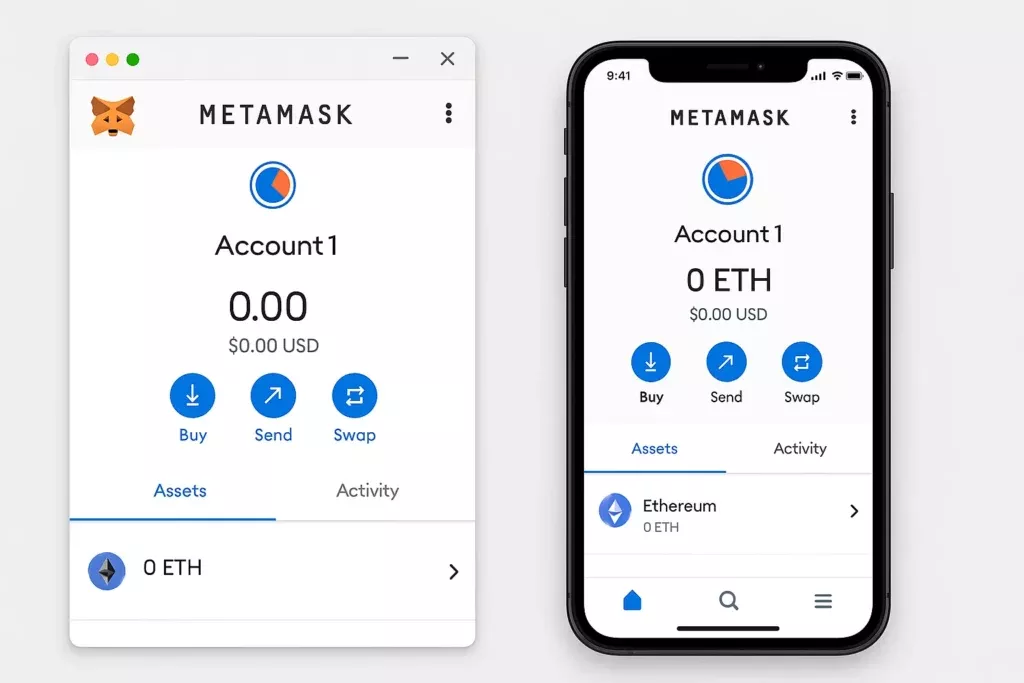
MetaMask is the most widely used crypto wallet in the world for interacting with Ethereum and DeFi protocols. It’s the gateway most people use when they first explore decentralised exchanges, yield farming, NFTs, and the broader Web3 ecosystem. And because of how widely it’s used and how much value flows through it, MetaMask wallets are among the most actively targeted in the entire crypto space.
The default MetaMask setup is functional. It is not secure enough for anyone holding meaningful value. This resource covers the expert-level measures that close the gaps between a default installation and a properly hardened MetaMask setup.
Understanding What MetaMask Is and Isn't
Before getting into security specifics, it’s worth being clear on what MetaMask actually is, because a common misconception leads directly to preventable losses.
MetaMask is a software wallet, specifically a browser extension and mobile app, that stores your private keys locally on your device and allows you to interact with Ethereum-compatible blockchains and their applications. It is not a hardware wallet. It is not custodied by a company. MetaMask the company does not hold your funds and cannot recover them if you lose access.
Your MetaMask wallet is only as secure as the device it runs on and the practices you apply to it. Unlike a centralised exchange where a company manages security infrastructure on your behalf, with MetaMask the security responsibility sits entirely with you.
This is the first and most important thing to understand.
Tip 1: Secure Your Seed Phrase Correctly From Day One
Every MetaMask wallet is generated with a 12-word seed phrase. This seed phrase is the master key to your entire wallet. Anyone who has it can import your wallet on any device and drain every asset inside it instantly.
MetaMask will present your seed phrase during setup and strongly encourage you to back it up. Do not skip this step, and do not treat it casually.
Write your seed phrase down by hand, in order, on paper or directly onto a metal backup plate. Verify every word carefully against what is displayed on screen. Store it in a physically secure location, separate from your device. Never store it digitally, never photograph it, never type it into any app or document on a connected device.
For a complete guide to backing up and storing your seed phrase to an advanced standard, our resources on how to store your seed phrase safely and the step-by-step crypto wallet backup guide cover everything you need to implement correctly.
Tip 2: Use a Strong, Unique MetaMask Password
MetaMask requires a password to unlock the extension or app on your device. This password encrypts the local storage of your private keys on that device. It is not the same as your seed phrase and it does not protect your wallet on other devices.
Use a strong, randomly generated password that is unique to MetaMask and not used for any other account. A reputable password manager makes this practical. A weak or reused password means anyone with access to your device can unlock your MetaMask and initiate transactions.
Tip 3: Keep Your Browser and MetaMask Extension Updated
MetaMask releases regular updates that patch security vulnerabilities and improve functionality. Running an outdated version of MetaMask leaves you exposed to known vulnerabilities that have already been identified and fixed in newer releases.
Enable automatic updates for MetaMask where possible, and check for updates manually on a regular basis. Apply the same discipline to your browser. An outdated browser is one of the most common entry points for the kind of malware and exploit scripts that target crypto wallet users specifically.
For a complete overview of hardening your browser environment for crypto use, our resource on advanced crypto security: protecting against malware and hacks covers this in detail.
Tip 4: Install MetaMask Only From the Official Source
This sounds obvious, but fake MetaMask extensions and apps are a documented and active attack vector. Malicious versions of MetaMask that look identical to the real thing are distributed through fake websites, phishing emails, and unofficial app stores. Once installed, they capture your seed phrase during setup and transmit it directly to attackers.
Always install MetaMask exclusively from metamask.io or from the official browser extension store for your browser, accessed by navigating directly to the store rather than following a link. On mobile, download only from the Apple App Store or Google Play Store, and verify the developer name is MetaMask before installing.
If you ever receive a link to download or update MetaMask from any source other than the official website or app store, treat it as a scam attempt. Our resource on how to avoid crypto scams covers phishing and fake application distribution tactics in detail.
Tip 5: Audit and Manage Your Connected Sites
Every time you connect MetaMask to a website or DeFi protocol, that connection is stored. Over time, your MetaMask can accumulate connections to dozens of sites, some of which may have been compromised, abandoned, or malicious since you first connected.
Regularly audit your connected sites through MetaMask’s settings. Remove any connections you no longer actively use or don’t recognise. A site you connected to once for a small transaction two years ago that has since been compromised retains the ability to prompt transaction requests in your wallet until that connection is removed.
To review connected sites in MetaMask: open the extension, click the three dots in the top right, navigate to Connected Sites, and review and remove any connections that are no longer needed.
Tip 6: Understand and Manage Token Approvals
One of the most exploited vulnerabilities in MetaMask security is excessive token approvals. When you interact with a DeFi protocol or decentralised exchange, you’re often asked to approve the protocol’s smart contract to spend a certain token on your behalf. Many protocols request unlimited approval by default, meaning the smart contract has permission to move any amount of that token from your wallet at any time.
If that smart contract is later exploited or turns out to be malicious, that unlimited approval can be used to drain your wallet of that token entirely without any further action from you.
Two measures address this directly. First, when approving token spending, manually edit the approval amount to only what is needed for the specific transaction rather than accepting unlimited approval. Second, regularly review and revoke existing token approvals using a tool like Revoke.cash, which connects to your MetaMask and displays all active approvals, allowing you to revoke any that are no longer needed or that you don’t recognise.
This is one of the most impactful security habits available to active DeFi users and is widely underutilised.
Tip 7: Never Enter Your Seed Phrase Into Any Website or Prompt
MetaMask will never ask for your seed phrase through a browser popup, a website form, a customer support chat, a Discord message, or any other channel except the MetaMask application itself during a wallet recovery process you have personally initiated.
If any website, pop-up, support agent, or community member asks for your seed phrase for any reason including account verification, wallet syncing, security checks, or claiming rewards, it is a scam. No exceptions.
Seed phrase phishing is the single most common method used to drain MetaMask wallets and it works because it doesn’t require any technical sophistication on the attacker’s part. It simply requires a convincing enough prompt to get you to type twelve words into a form. The risks and scams Cryptopedia category covers the full range of these social engineering tactics in detail.
Tip 8: Use a Dedicated Browser Profile for MetaMask
As covered in our advanced crypto security resource, isolating your MetaMask activity to a dedicated browser profile is one of the most effective ways to reduce your attack surface.
A dedicated profile contains only MetaMask and the minimum necessary extensions. It is never used for general browsing, social media, email, or any activity unrelated to crypto. This separation means that a compromised extension or malicious script encountered during everyday browsing cannot interact with your MetaMask session.
Take this further by using a dedicated device for your MetaMask activity entirely if your holdings justify it. A device used exclusively for DeFi interaction with a clean operating system and minimal installed software is a meaningfully more secure environment than a general-purpose computer.
Tip 9: Connect MetaMask to a Hardware Wallet
For anyone holding significant value that they actively use in DeFi through MetaMask, connecting MetaMask to a hardware wallet is the most impactful security upgrade available.
MetaMask supports integration with Ledger and Trezor hardware wallets. In this configuration, MetaMask acts as the interface while the hardware wallet holds the private keys and must physically confirm every transaction. Even if your computer is fully compromised by malware, no transaction can be executed without physical confirmation on the hardware wallet device.
This setup gives you the convenience and connectivity of MetaMask with the security architecture of cold storage. For active DeFi users managing meaningful value, this combination is the recommended standard.
Tip 10: Use a Separate Burner Wallet for New or Unverified Protocols
No matter how careful you are, interacting with new, unverified, or experimental DeFi protocols carries inherent smart contract risk. Wallet drainer scripts, malicious token approvals, and exploitable smart contracts are a consistent feature of the DeFi landscape.
The solution is simple: maintain a separate burner MetaMask wallet with minimal funds for any interaction with protocols you haven’t thoroughly vetted. Your primary wallet, holding the bulk of your assets, never connects to unverified sites or new protocols until they have a proven track record.
Create a second MetaMask account within the same extension, fund it with only what you need for the specific interaction, use it for the transaction, and withdraw the results back to your primary wallet once confirmed. This approach contains the blast radius of any malicious interaction to the small amount held in the burner wallet.
Tip 11: Be Vigilant About Fake MetaMask Support
MetaMask has no official support on Twitter, Discord, Telegram, or Reddit that will proactively reach out to you. There are no MetaMask support agents in community channels who will DM you offering to help with a problem.
Every account claiming to be MetaMask support in a community channel or via direct message is a scam. The playbook is consistent: they offer to help, they direct you to a fake support site, they ask for your seed phrase, and they drain your wallet. This happens daily across every major crypto community platform.
The only legitimate MetaMask support is through metamask.io directly. If you have a genuine support issue, navigate to the official site yourself. Do not follow links, do not engage with unsolicited support offers, and do not share any wallet information in any community channel under any circumstances.
Key Takeaways
MetaMask security is your responsibility alone. Secure your seed phrase correctly from day one and never expose it digitally or share it with anyone. Keep MetaMask and your browser updated, install only from official sources, and audit connected sites and token approvals regularly. Use a dedicated browser profile for MetaMask activity, connect to a hardware wallet for significant holdings, and maintain a separate burner wallet for interacting with new or unverified protocols. And treat every unsolicited MetaMask support approach as a scam, because it is.
The DeFi ecosystem offers genuine opportunity. Accessing it safely requires treating your MetaMask setup with the same seriousness you’d treat the security of any other significant asset.
For everyday investors building their foundation in wallet security and DeFi participation, our Runite Tier Membership provides step-by-step education and guided frameworks to do it right from the start. For serious investors actively deploying capital across DeFi protocols who want personalised security and strategy support, our Black Emerald and Obsidian Tier Members receive dedicated specialist guidance tailored to their specific setup and risk profile.
Find out more at shepleycapital.com/membership.
Frequently Asked Questions
How do I secure my MetaMask wallet?
Secure MetaMask by storing your seed phrase offline in a safe physical location, enabling a strong password, using MetaMask only on trusted devices, never clicking unknown links, regularly revoking unused token approvals, and considering connecting it to a hardware wallet for added security.
What are the biggest security risks with MetaMask?
The main risks include phishing sites that mimic legitimate DeFi protocols and steal approvals, malicious browser extensions that intercept transactions, clipboard hijackers, and seed phrase theft through social engineering or device compromise.
Can I connect MetaMask to a hardware wallet?
Yes. MetaMask supports connection to hardware wallets like Ledger and Trezor. This keeps your private key offline while still letting you use MetaMask's interface to interact with DeFi apps, significantly improving security.
What are token approvals and why should I revoke them?
Token approvals grant smart contracts the ability to move tokens from your wallet. If a protocol you approved is later exploited or turns malicious, it can drain your funds. Regularly reviewing and revoking unused approvals using tools like Revoke.cash reduces this exposure.
How can I tell if a MetaMask transaction request is legitimate?
Read every transaction request carefully before signing. Check the contract address matches the official protocol, look for suspicious permissions like unlimited token approvals, and verify the site URL is correct. Reject anything you do not fully understand.
What should I do if my MetaMask wallet is compromised?
Move all remaining assets to a new wallet immediately using a clean, uncompromised device. Revoke all outstanding approvals on the compromised address. Treat the compromised seed phrase as permanently exposed and never use that wallet again.
Should I use MetaMask on a mobile device or desktop?
Both have risks. Mobile devices are vulnerable to malicious apps; desktops are vulnerable to browser extension attacks. On both platforms, keep the device clean, use only the official MetaMask extension or app, and avoid mixing crypto activity with general browsing.
Is MetaMask safe for storing large amounts of crypto?
MetaMask is generally not recommended for storing large long-term holdings. As a hot wallet it remains internet-connected and exposed to online threats. For larger amounts, a hardware wallet provides significantly better security.